27 secret sales lead generation techniques that you probably aren't using.

Many businesses are using only two or three of the most obvious and least effective means of sales lead generation. Yet there are dozens of practical sales prospecting methods that anyone can use to find more sales leads and opportunities.
These methods are so little used that they seem like secrets, somehow kept out of sight and mind. Here are 27 low cost/no cost practical sales lead generation techniques that can be put to use immediately:
- Have Clive Miller host a call for generating sales leads.
- Set Google alerts for sales lead generation. Find online conversations that speak of issues that your products or services fix. Learn how to do this in another article here: Sales Lead While You Sleep
- See who in your target market is hiring. You can use Google alerts and online job search tools to flag up adverts for roles at companies in your market. Those hiring have positive momentum and are more likely to be good business prospects.
- See who in your target market is hired. Most new appointments are announced to the press and reported in relevant industry journals. Use Google alerts and news clipping services to see who has been hired for roles that involve using or specifying what you offer. Those hired will be looking to make their mark. They will be more receptive to an approach and more open to new ideas in the early weeks of a new job.
- Collect ready-made sales prospect lists from the journals that serve your target market. Many journals and magazines publish useful lists of companies that are notable for a particular reason. For example, "Innovation Leaders". Publishing useful lists helps to attract readers and expand circulation. Such lists often include valuable additional information about each entry. You don't have to wait for a list to be published. Contact the editors and ask about lists published previously. Identify the ones you want and ask if back issues are available. Often you can obtain them free of charge.
- See who is advertising for sales lead generation. Seek out the trade journals, magazines, and ezines that those who buy from your customers read and note who is advertising. The advertising businesses market to that same audience that your customers sell to and so are likely sales prospects for you.
- List your customers' competitors. It is easy to compile a list of suppliers for whatever they offer using suitable search terms via Google. Customer competitors are likely prospects for your products or services.
- See who your competitors list as references. Competitors web sites normally list their best customers through case studies and testimonials. Add them to your prospect list. Even if what you sell isn't differentiated, some of the testimonials and case studies will be old. Requirements and perceptions are always changing.
- Join your competitors' user groups. Many suppliers have user groups or at least a dedicated online forum for customers. Those who join normally have access to the list of members - an ideal list for sales prospecting and sales lead generation.
- Join special interest groups that relate to your market of focus on your solution superset. As for competitors' user groups, membership usually includes access to the list of members. Searching online should quickly identify the industry bodies, special interest groups, and forums relevant to your offering.
- Attend exhibitions where your customers exhibit for sales lead generation. The other exhibitors are likely prospects and in quite spells, it is easy to gather intelligence for sales lead generation..
- Buy a single share in competitive organisations. As a shareholder, you will be sent shareholder reports and company news. Shareholder communications often include useful market intelligence as well as competitor intelligence.
- Buy a single share in complimentary suppliers who serve the same markets. As for competitive organisations, shareholder communications from those who sell to the same markets that you do will include useful market intelligence.
- Ask your suppliers about sales lead generation. If you are a good customer, your suppliers will be predisposed to help with reasonable requests. They will be reluctant to turn you away if they want to keep your business. Give a clear definition of the value that you provide and then ask about those needs amongst various classifications of your suppliers' contacts. Ask about their suppliers, their business partners, and their customers. Remember, you are not asking for an introduction (at this stage), just an intelligent opinion on who would benefit from what you sell.
- Ask your business partners. As for suppliers, business partners who you collaborate with for any reason, are likely to respond positively. Ask the right people. Take the trouble to succinctly explain what you are seeking. Keep it short and to the point and ask for help. Take the time to be brief.
- Ask your professional contacts. As for suppliers and business partners, professional contacts who you have a good relationship with are likely to try and help. Prepare your request carefully so that your contacts can help without having to invest a lot of time.
- Ask your customers. Asking for referrals in a general way often fails to inspire a useful answer. Individuals can have thousands of professional contacts. Just asking who a person knows who might need . . . is too broad a question. Narrowing the focus by asking who they know in a particular subset of contacts or in a particular geography, or who are in a particular business is usually met with more success. There are 17 ways to get referrals. I have detailed all of them in LinkedIn posts that are linked on this page.
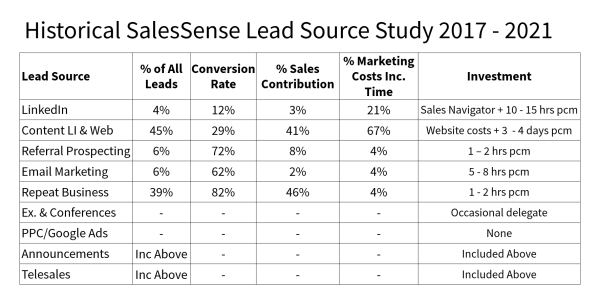
- Have customers volunteer referrals. Salespeople are often reluctant to ask for referrals because it can make the people uncomfortable and if the request is denied, even politely, the salesperson's confidence may take a hit. The sales prospecting approach explained in this article leads customers to volunteer referrals: Referrals With and Without Asking
- Search LinkedIn for potential customers where you have links to contacts. For this to be really useful, you need several hundred LinkedIn connections whom you know well enough to call. Use the 'People' search box for search terms that describe the things likely customers do. This will produce a list of contacts in your extended network who have the search phrase in their profile. There are additional tools for refining the results. If you are a paying member, you can use an expanded set of sophisticated search filters.
- Ask other companies who supply complementary products or services to the same market. This can be a sales lead exchange. If you don't compete and you have some respect for a company that supplies similar customers, you could exchange sales prospecting lists and make introductions.
- Swap discarded leads with a competitor for sales lead generation. This isn't as foolish as it sounds. Simply collect together all the leads where you have decided there is no hope and offer them to a competitor in exchange for an equivalent number of their 'no hope' leads. Just because you have no hope of selling a particular prospect doesn't necessarily mean that your competitor can't and vice versa.
- Ask your boss. Salespeople might expect their boss to provide guidance for sales lead generation and some do. If your boss hasn't provided some valuable suggestions, ask for them.
- Drive around your territory. While you drive around your territory, make a point of taking detours through industrial estates and business parks. Carry a Dictaphone to record the details of any likely prospects you spot. If you have time, drop in and ask for the names of appropriate people.
- Run a competition for sales lead generation. Competitions have long proved effective for sales lead generation. Use a cool prize paid for by a sponsor who will exchange it for the list of competition participants and their contact details. Challenge participants to submit their best ideas for future developments in your field. Use email, blogging, social media, and web pages to spread the word.
- Create a compelling survey. Choose a subject to generate results that your target audience (potential customers) would be eager to get their hands on. It is interest in results that motivates participation.
- Create a profile that describes your best customers. Include their size, markets, market share, and business objectives. Use the profile to identify or find other businesses that are similar.
- Ask customers who don't buy. Say something like, "Thanks for the opportunity to compete for your business. While we haven't been able to serve your needs on this occasion, you have had a chance to understand the distinct value we offer. Would you help me out by suggesting other people you know where you think our offering might be a better match to their needs?" If you have maintained rapport, this appeal is likely to elicit a positive response because the person concerned feels bad about delivering the disappointing news. Bearers of bad news will thank you for providing them with an opportunity to repair their feelings by doing you a favour.
- Negotiate a referral agreement for sales lead generation. If you are pressed to make concessions when you negotiate a sale, ask for something in return. Say, "In return, when you are satisfied that we have delivered, would you agree to provide us with five referrals - introductions to businesses whom you know could benefit in the same way?" Negotiators will usually agree to this because it has no fiscal impact on the deal and delivery is in the future. Having agreed, the customer will feel obliged to comply when you come back to ask for the introductions.
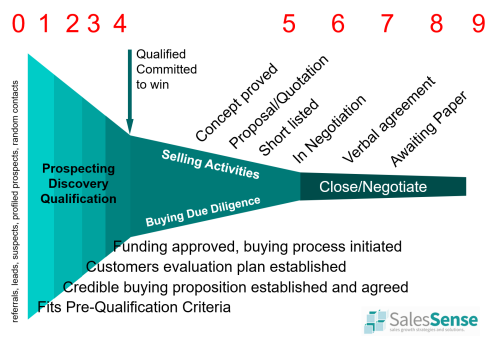
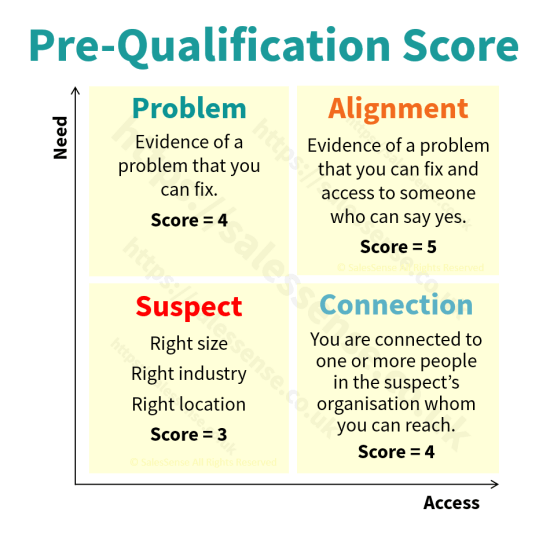
Finding people who can benefit from what you have to sell is a major part of the selling process. If you choose the right prospects, the next stage - initiating a conversation - is much easier. Just as sales lead generation can be systematised, so can the process of contact and qualification.
These three steps - discovery, contact, and qualification set the scene for success in the remaining stages of a sale. Doing things right is a waste of time if you don't first choose the right opportunities to work on.
Article by Clive Miller
Related Content:
- Sales Prospecting Articles
- Cold Calling is Dead - Long Live Cold Outreach
- GDPR Compliant Sales Prospecting Techniques
- When you Hate Cold Calling
- Get Introductions from People You Don't Know
- Reach and Engage with More Sales Prospects
Related Courses:
- Social Networking for B2B Sales
- Telesales Training
- Selling Appointments at C-Level
- Sales Prospecting for Business Development
- Business Development Management
Free Assessments
- SDR - BDR - Telesales
- Professional Sales Skills and Habits
- Sales Knowledge Assessment
- Sales Win Predictor
If you need to find more likely sales prospects, develop better sales prospecting methods or increase sales lead generation, we can help. Telephone +44 (0)1392 851500. We will be pleased to learn about your needs or talk through some options. Alternatively, send an email to custserv@salessense.co.uk or use the contact form here.